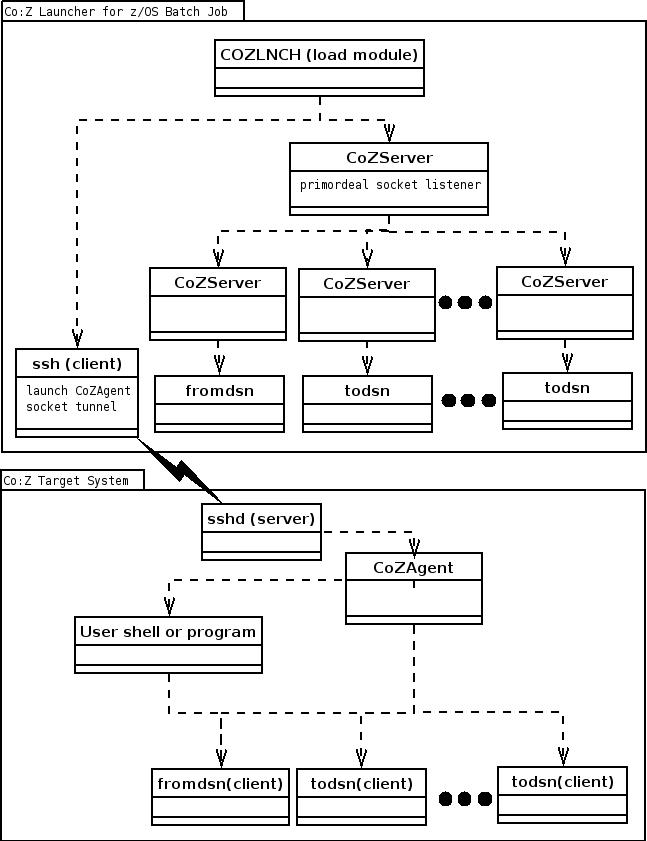
This part of the Co:Z User's Guide contains information to help you diagnose problems with the Co:Z Launcher.
The following sections describe the symptoms of several common Co:Z configuration problems.
- EDC8127I Connection timed out
- cozagent: command not found
- /usr/bin/cozagent: Permission denied
- Host key verification failed
- Permission denied (publickey,keyboard-interactive).
- command not found for fromdsn or todsn on //STDERR DD
EDC8127I Connection timed out | |
If you receive a "EDC8127I Connection timed out" trying to ssh to your Target system,
ensure that the ssh daemon (sshd) is started on the target machine. Confirm that
you can connect by starting a local ssh session: | |
cozagent: command not found | |
Make sure that the Co:Z target toolkit has been downloaded and installed on the
target system as described in the installation instructions. By default, the executables,
including cozagent are installed in the directory | |
/usr/bin/cozagent: Permission denied | |
This is likely due to not having the execute bit set on the Co:Z target
executables. Locate the directory where they are installed and execute the following:
| |
Host key verification failed | |
Ensure that you have added the target system's host key to
ZOS$ ssh user@68.255.253.94
The authenticity of host '68.255.253.94 (68.255.253.94)' can't be established.
RSA key fingerprint is 09:2c:46:23:56:4e:8f:15:ee:26:5a:12:ec:8d:3a:99.
Are you sure you want to continue connecting (yes/no)? yes
| |
Permission denied (publickey,keyboard-interactive). | |
Usually due to an attempt to connect to a target server with a userid that doesn't have a keypair set up with the calling z/OS system. See the "Configure and test sshd" section in the Co:Z Target System Toolkits installation steps. | |
command not found for fromdsn or todsn on //STDERR DD | |
The z/OS Co:Z Launcher uses ssh to first launch the CoZAgent executable
at the default path: This is sufficient on most Unix/Linux distributions, but some distributions
such as SUSE have default login profiles that reconstruct the PATH variable from
scratch, and lose this information when a new login shell is started. In these cases,
you will need to update the login profile to include the Assuming that your default shell is bash, here is an example that verifies that an existing PATH variable is not lost by a new login shell:
linux$ export PATH=foo:$PATH
linux$ bash --login
(a new shell)
linux$ echo $PATH
(check for the presence of "foo")
linux$ exit
If you find that your target distribution has this problem, you will need to
update the |
Several aspects control the logging of messages and trace information in the Co:Z toolkit:
- The logging level
A threshold level: Error, Warning, Notice, Info (default), Debug, and Trace. Fine. Each message has a level and will only be logged if that level is at or below the current logging threshold.
- The component's logger object
Each major component in the system will typically have its own logger, which can have its own threshold level set, or can use the default threshold.
- The common logging destination
All logger messages eventually go to the same logging logging destination, which defaults to stderr, but a specific file, a user-written routine, or the SYSLOG facility may also be used.
Logging options are set using either the -L
command-line switch or by by setting the COZ_LOG
environment variable. In either case, the value of the setting is a list of one
or more of the following values:
- E|W|N|I|D|T|F
The default logging threshhold: Error, Warning, Notice, Info (default), Debug, Trace, Fine.
- t
Prefix log messages with a system timestamp.
- e
Include consumed cpu time in log messages.
- f=filepath
Messages are logged to the given filepath instead of stderr.
- s
Messages are logged to SYSLOG facility instead of stderr.
- logname=E|W|N|I|D|T|F
Set a specific log name to the given threshold
The following examples demonstrate how to enable logging for various Co:Z toolkit components:
The following example uses the -LT command switch to set the default logging level to "Trace" for all components in the batch launcher job (but not the target system components). The t option is also used to prefix all messages with a timestamp.
//COZLG1  JOB (),'COZ'
//STEP1   EXEC PROC=COZPROC,
//        ARGS='-LT,t myuid@linux1.myco.com'
//COZCFG DD *
server-env-COZ_LOG=T,t
//STDIN   DD *
# This is input to the remote shell
echo "We are running on: " `uname -sr`
//
The following example uses the agent-options property to set the -L command line switch to configure CoZAgent logging.
The example also sets the target system environment variable COZ_LOG
to set logging options for all other target components. Environment variables for
the target system can be set using the target-env- property prefix
in the Co:Z Launcher configuration properties DD (COZCFGD).
//COZLG1  JOB (),'COZ'
//STEP1   EXEC PROC=COZPROC,
//        ARGS='myuid@linux1.myco.com'
//COZCFG DD *
agent-options=-LT,t
target-env-COZ_LOG=T,t
//STDIN   DD *
# This is input to the remote shell
echo "We are running on: " `uname -sr`
//
It is sometimes useful to increase the verbosity of ssh itself to determine
a problem source. To do this for the ssh client (used by the Co:Z Launcher process),
add one or more v switches to ssh-options property in
COZCFG:
//COZCFG DD *
ssh-options=-vv
//
More v's increase the debug level. Note that ssh can produce
lots of output.